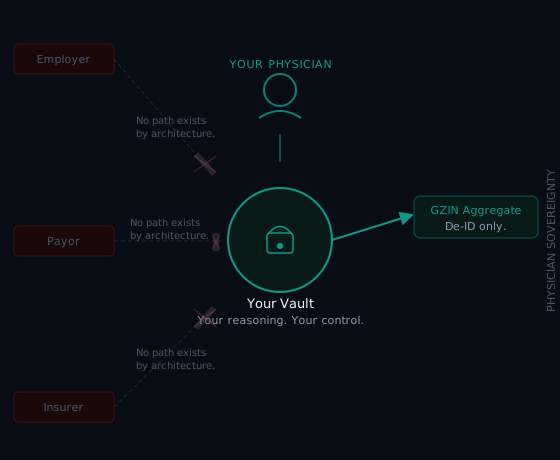
PDI Med was designed from the start with one constraint: physicians must be able to trust it completely. Here is exactly how that trust is built, where your data lives, what we can and cannot access, and how PDI Med works as your HIPAA Business Associate.
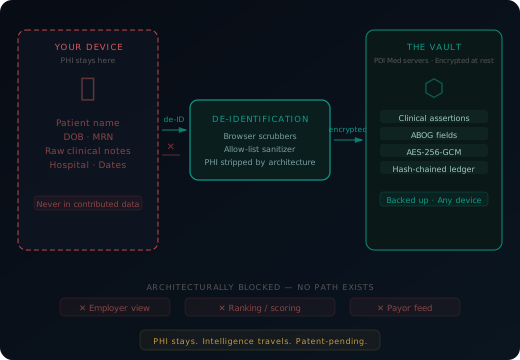
Your case records — full clinical detail, patient identity intact — are encrypted in your browser with AES-256-GCM under a key only you hold. The vault is the only place that full clinical detail lives. The key never reaches PDI Med at all — which is why PDI Med has zero knowledge of your vault's contents. As your host we hold the envelope, not the letter: the encrypted vault, plus the de-identified case-log details the app needs — diagnoses, procedures, ABOG categories and dates of service — linked to a patient code only your vault can resolve. The clinical detail inside the vault, we never see.
That vault is stored on Amazon Web Services, in HIPAA-eligible services covered by PDI Med's Business Associate Agreement with Amazon — the same cloud environment major health systems use. PDI Med stores it as ciphertext and holds no key that can open it.
Your data is also portable. You can export your complete vault at any time — every case, every note, every field — in a format you control. If you leave PDI Med, you leave with everything you put in. Nothing is held hostage.
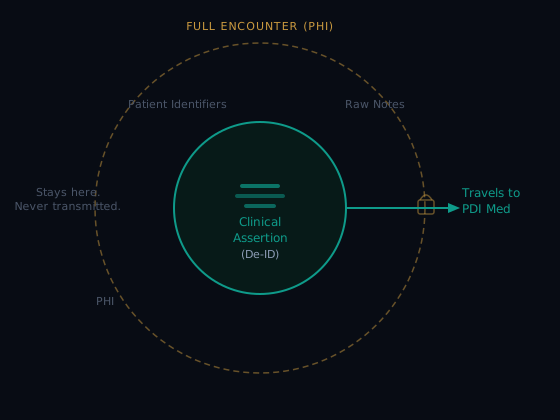
One exception worth naming: the de-identified intelligence that flows into the GZIN — aggregate signals, population-level patterns, de-identified clinical assertions only — belongs to PDI Med. That's the trade. Your PHI stays encrypted and physician-controlled. The anonymized knowledge it generates funds the platform that protects it.
HIPAA compliance for a clinical intelligence platform comes down to two questions: where does PHI go, and who can access it? PDI Med's answers are architectural — baked into how data moves, not just what the privacy policy says.
Your full clinical records — patient name, date of birth, MRN, diagnosis, note content — are encrypted at rest with AES-256-GCM under a physician-controlled key that never reaches PDI Med. The vault is the only place that full clinical detail lives, and your vault is zero-knowledge to PDI Med — we cannot read what is in it. Outside the vault, our servers keep the de-identified case-log details the app needs, including dates of service, linked to a patient code only your vault can resolve.
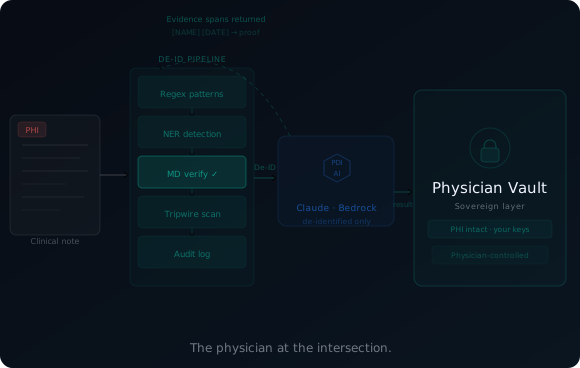
Before a note is sent for parsing, your browser replaces identifiers with placeholders and you review the result; our servers check it again and refuse recognizable identifiers. The GZIN collective intelligence layer is not active yet — nothing from your account is contributed.
Your note goes through multiple layers of de-identification before anything reaches PDI Med's AI. What the AI receives is clinical language only — diagnosis, procedure, vitals, clinical reasoning — the same information you'd share in a grand rounds presentation. Patient name, date of birth, and medical record number are removed before transmission. You see and approve the de-identified output before it leaves your device. PDI Med keeps a fingerprint of exactly what was sent, and the AI runs on Amazon Bedrock inside our own AWS account — never at Anthropic.
When the GZIN opens, the de-identified clinical patterns, ABOG category distributions, and procedure classifications you contribute will become part of PDI Med's collective knowledge base. We curate, protect, and use this intelligence to improve the guidance every physician on the platform receives. No individual physician's identity is traceable in it. The intelligence travels. The identity does not.
PDI Med signs a Business Associate Agreement with each physician, in the app, before any patient information is entered. During the beta PDI Med does not enter into agreements with hospitals or other organizations. You retain your own HIPAA obligations as a treating physician — PDI Med doesn't change them.
Your ABOG file is de-identified to ABOG's case-list requirements — no names or MRNs. ABOG's entry system has no hospital, patient initial, or patient ID field at all; ABOG auto-generates a Case ID. PDI Med produces your ABOG file in that format automatically, and a De-ID CSV — ages banded, facility removed — is also available. You don't have to do that work separately.
Spreadsheets are what physicians use when no better option exists. They are not HIPAA-compliant when they contain PHI and sit on an unencrypted personal laptop. They have no validation, no flags, no backup, no version history, and no export that matches ABOG's format. The file you build over 12 months is one hard drive failure away from gone.
Your full vault — every case, every field, every note — is encrypted automatically under a key only you hold, so your case list is not trapped on one machine. The trade is real and worth knowing up front: because we never hold that key, we cannot restore your vault for you. Keep your 12-word recovery code somewhere safe. Lose it and your passkey both, and no one can open the vault — us included.
A suite of automated ABOG compliance checks fires at commit. Missing uterine weight, wrong category, absent GA — caught the day you log the case, when you still know where to find the answers.
An Excel file with patient names, dates, and diagnoses on an unencrypted personal laptop is a HIPAA exposure. PDI Med encrypts before storage. The vault is compliant. The spreadsheet wasn't.
Spreadsheets don't produce ABOG-format exports. PDI Med does. De-identified, board-formatted, all required fields included or flagged. Generated in 20 seconds — a submission-ready file you download and upload to ABOG.
PDI Med does not connect to your EMR. There is no integration to configure, no IT department to engage. If your employer has policies about outside clinical tools, they apply to you — you are responsible for being authorized to use PDI Med for the patient information you enter. You paste a clinical note — H&P, operative note, office visit, delivery note, whatever you wrote for that patient — and the parser does the extraction.
This means PDI Med works with Epic, Cerner, Athena, eClinicalWorks, or any other system your institution uses. If you can copy text from a note, you can use PDI Med. There is no exception list. There is no waiting for your health system's IT roadmap.
Copy your clinical note. Paste into PDI Med. Parser extracts ABOG fields in ~20 seconds. Works with any EMR that can display a note as text.
We are actively working with EMR partners on contextual launch integrations that will reduce the copy-paste step entirely. You don't have to wait for this — the current workflow works now — but it's coming.
The AI Board Examiner is not available yet. It is expected December–January, at no additional cost for founding members. See the full architecture →
Once your case list is built, you can practice defending it.
Your cases. A simulated ABOG oral board examiner. "Tell me about this patient." You present. "What else?" You add more. "What if she deteriorated?" "What if you're at a rural hospital?" "What does ACOG say about that?"
The examiner doesn't affirm you. It doesn't say "great answer." It asks "What else?" until you run out. That's the board format. That's what you're preparing for.
At the end: a structured debrief. Strengths. Gaps. The ACOG guideline you need to review. One board tactic specific to your session.
Board prep companies charge $300–500 for generic question banks. PDI Med is building an examiner that knows your actual cases — expected December–January, at no additional cost for founding members.
How does PDI Med handle HIPAA?
PDI Med acts as your Business Associate and signs a Business Associate Agreement with you, in the app, before any patient information is entered. Your vault's contents are zero-knowledge to PDI Med — encrypted in your browser with AES-256-GCM under a key we never receive. Notes are de-identified in your browser, with HIPAA Safe Harbor methodology applied systematically, and you review them before they are parsed; the de-identified text is processed by Claude on Amazon Bedrock inside our AWS account, under our Business Associate Agreement with Amazon. HIPAA compliance is a property of your practice's program, not of a software product, so we describe the specific controls instead — see Security.
Do I need hospital or institutional approval to use PDI Med?
PDI Med doesn't connect to your EMR, your hospital network, or any institutional system. You copy a clinical note and paste it into PDI Med. There is no IT integration and no network access. If your employer has policies about outside clinical tools, they apply — you are responsible for being authorized to use PDI Med for the patient information you enter.
Can PDI Med see my patient data?
Not what is in your vault. Your vault's contents are zero-knowledge to PDI Med: encrypted in your browser under a key that never reaches us. Outside the vault, our servers hold the de-identified case-log details the app needs — diagnoses, procedures, ABOG categories and dates of service — linked to a patient code only your vault can resolve, plus your account details. When a note is parsed, its de-identified text passes through our servers to the AI and is not kept. The full list is in your agreement and on our Security page.
What happens to my data if I stop using PDI Med?
You can export your complete vault at any time — every case, every note, every field. Your data is yours. If you leave, you leave with everything. We do not hold data hostage or charge for export. Your case list belongs to you. To delete your account, email dan@pdi-med.com.
Is the ABOG export actually in the right format?
Yes. De-identified to ABOG's case-list requirements — no names or MRNs. Formatted to ABOG case list field requirements. All required fields included or flagged as missing. The file you generate is the file you download and upload to ABOG. No reformatting required. A De-ID CSV — ages banded, facility removed — is also available separately.
What if I already started collecting in Excel?
Start using PDI Med from here forward. Log going-forward cases through the parser. You don't lose your prior work — you stop losing what comes next. Most attendings who switch mid-year wish they'd started on day one, but switching in month three is still significantly better than switching in month twelve.
What's the difference between the vault and the GZIN?
The vault is your encrypted personal clinical record — full detail intact, and zero-knowledge to PDI Med. The GZIN is the collective intelligence layer; it is not active yet, and nothing is contributed from your account. Before it opens, your agreement will be updated and you will be asked.
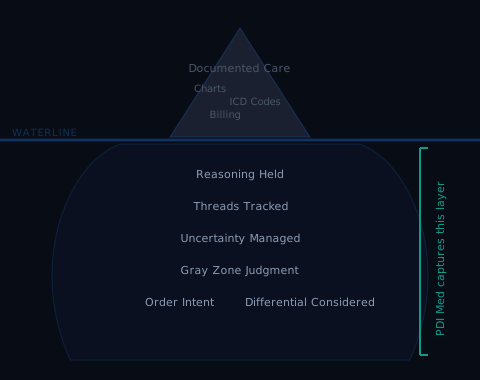
PDI Med was built first for the physician facing their most acute problem: building a case list from scratch, under time pressure, with no tool designed to help them. That problem is specific to board eligibility. But the intelligence we are building is not.
None of this is available today. We are telling you now because the physicians who join as Live Board Examiners in the next 12 months will shape how this platform is designed. You won't be inheriting it. You'll be building it with us.
The platform does the analytical work before you arrive. Your 30 minutes is spent doing what you already do well — applying clinical judgment under pressure.
Every faculty member is interviewed before onboarding. Every session is rated — by the physician, and by the faculty member. The feedback is bidirectional and it informs everything.
No retainer. No minimum hours. Paid per completed session.
Payments via 1099 consulting agreement. Direct deposit within 7 days of session completion. Founding faculty receive a $500 onboarding bonus after completing their first 5 sessions.
The requirements are straightforward. The harder question — whether this is something you actually want to do — is what the interview is for.
We've described the surface here deliberately. The full picture — how the platform prepares your brief, what the AI Board Examiner session produces, what you'll see before every session, and how we've structured the technology so the analytical work is already done before you arrive — is shared with faculty after onboarding.
What we can say now: the prep work per session is minimal by design. We built the platform so that physicians like you spend their time doing what physicians do — not reading compliance reports or counting case list fields.
This is a short form, not a formal application. If it seems like a fit, we'll be in touch to schedule a conversation.
Applications open July 1.
This form will open for board-certified OB/GYN physicians on July 1, 2026. Stay connected →