⚠️  The 2027 ABOG Bulletin has been published. PDI has reviewed it. View what changed [Dismiss]
PDI Med Case List

Your case list. Built from the note you were going to write anyway.

Paste a clinical note. Get a complete, ABOG-formatted case list entry in about 20 seconds — with every required field extracted, every blocker flagged before it becomes a problem, and your full clinical record encrypted under your own key the moment you commit.

Any EMR · any note format Built-in compliance flags Live count + deadline tracking PHI encrypted on commit
Built to ABOG’s current case-list categories — 30 Obstetrics · 32 Gynecology · 39 Office Practice — updated when ABOG changes them
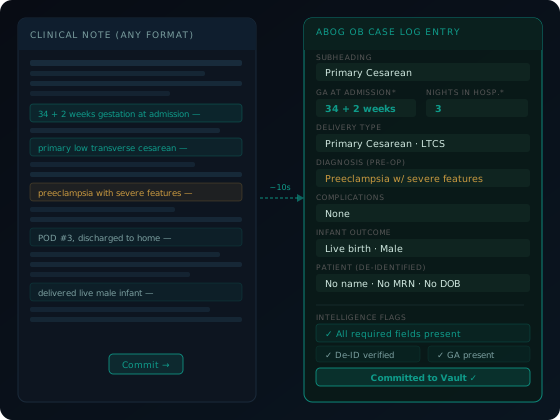
Case log parser UI
01 — The Parser

Any note. Any EMR. Any format. ABOG fields extracted.

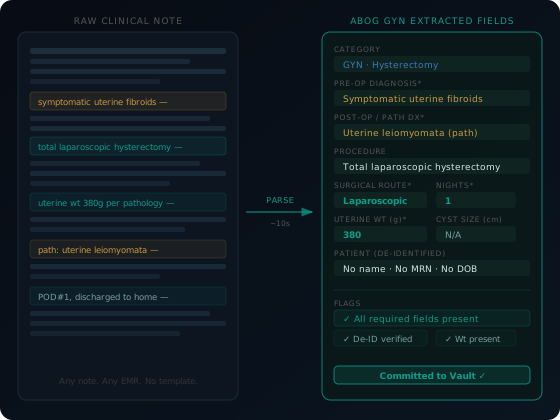
Copy your clinical note from Epic, Cerner, Athena, or any system that displays text. Paste it into PDI Med. The parser reads it — H&P, operative note, office visit, delivery note, whatever you wrote — and extracts the ABOG fields automatically.

In about 20 seconds you get:

  • ABOG section (OB / GYN / Office) and case category
  • Gestational age at admission — standardized to weeks + days
  • Pre-operative and post-operative diagnosis
  • Procedures performed and surgical route
  • Complications, with presence/absence noted
  • Estimated blood loss when clinically relevant
  • Nights in hospital
  • Uterine weight in grams — extracted from the pathology impression
  • Cyst diameter in cm — extracted from operative or imaging language

The richer your note, the better the extraction. You wrote it for the patient record anyway. The parser turns it into your case list entry without any extra work on your end.

No template to fill. No ABOG-specific fields to remember mid-note. Write your note the way you always write it. PDI Med handles the translation.
Parser extraction diagram
02 — ABOG Compliance Flags

Caught at commit. Not in March.

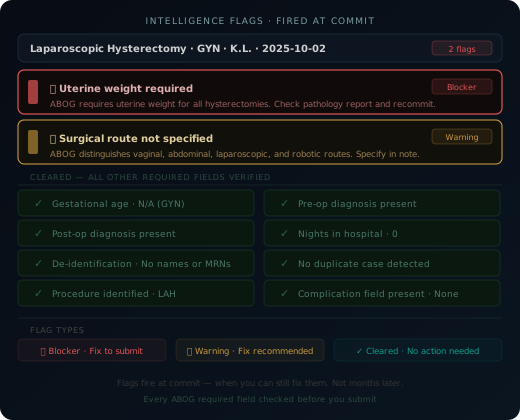
A suite of automated ABOG compliance checks fires the moment you commit a case — when you still know where to find the answer. A missing uterine weight is a 30-second fix today. It's an impossible retroactive search six months from now. Flags are divided into two types:

Blockers — caught by the completeness check

Missing required ABOG fields (uterine weight, gestational age, cyst size), Office count not exactly 40, normal delivery in the OB section. You can always preview and export a working draft; the completeness checklist runs when you go to output the ABOG file and flags anything still missing. A category that is already full is not a blocker — ABOG requires every GYN surgical patient and every complicated OB patient you primarily cared for to be listed, and the two-per-category cap is a crediting rule, not a listing rule.

Warnings — strategic and quality signals

Vague procedure documentation, missing high-yield case types (no vaginal hysterectomy, no urogyn), surgical route not specified, procedure-diagnosis mismatch, duplicate case detection. Warnings aren't completeness failures — they inform your decisions before it's too late to change them.

Intelligence flags panel
⚑Missing uterine weight on hysterectomy
⚑Category at or near maximum count
⚑Normal delivery in OB section
⚑Missing gestational age at admission
⚑Cyst size absent on ovarian case
⚑Procedure conflicts with stated diagnosis
⚑Office count not exactly 40
⚑Surgical route not specified
⚑Duplicate case detected
⚑No vaginal hysterectomy on list
+ more automated checks covering every ABOG required field and strategic coverage gap
03 — The Intelligence Dashboard

Your case list. Live. Every number that matters, always visible.

The PDI Med case list dashboard is not a spreadsheet. It is a live view of your compliance status — updated the moment you commit a case, always visible at the top of your screen.

At every session you see:

OB
Section counts with live max tracking

ABOG's case requirements are separate from its category lists: every complicated OB case, at least 20 (normal uncomplicated deliveries are not listed), every GYN surgical case, at least 20 (admitted, short-stay and outpatient), and exactly 40 Office cases. No more than two cases per category count toward a minimum, so you see before you commit that you already have 2 preeclampsia cases and a third won't add to the count — you still list it. Collect more than 40 office cases: at export the builder selects every GYN and complicated OB case and takes your Office 40 across categories first, then by case strength, and you can override.

⏱
Live count vs. requirement

Your committed count shown against each ABOG requirement, updated as you commit. There is no monthly pace target: real case volume is uneven — GYN clusters near December — so a ramp would misread a normal month as falling behind. You see where you actually stand from month 2, not month 10.

⚑
Active blocker and warning count

Every unresolved blocker and warning shown in the intelligence strip. Clicking a flag takes you directly to the case that triggered it — not to a search result. Fix it while the case is still fresh.

⏰
Hard deadline countdown

The 2027 dates count down in real time: final application Apr 30, 2027, collection closes Jun 30, 2027, case lists due Jul 31, 2027, and ABOG's absolute cutoff of Aug 31, 2027 at 11:59pm CT, after which the system blocks submission. All are visible from day one of the collection year. Missing the cutoff means waiting another year.

Case log intelligence dashboard
04 — Care Arc Linking

The Office section requires visit counts. PDI Med tracks them automatically.

ABOG's Office section requires exactly 40 cases — each with a documented number of office visits for that patient. For a follow-up endometriosis patient you've seen four times, ABOG wants to see 4 visits attached to that case record.

Without automatic tracking, this means manually counting back through months of clinic notes trying to reconstruct how many times a specific patient was seen for a specific problem. Most physicians undercount. Some discover the problem at export.

When the parser detects an encounter for a patient already in your vault, it offers to link the visit to the existing care arc for that case. You confirm. The visit count on that Office case entry increments by one. When you're ready to submit, the visit count is already there — accurate, without a single manual calculation.

Parser detects returning patient Links to existing case arc Visit count increments automatically Accurate at export — no reconstruction
Care arc linking diagram
05 — The Vault

Your full clinical record. Encrypted the moment you commit.

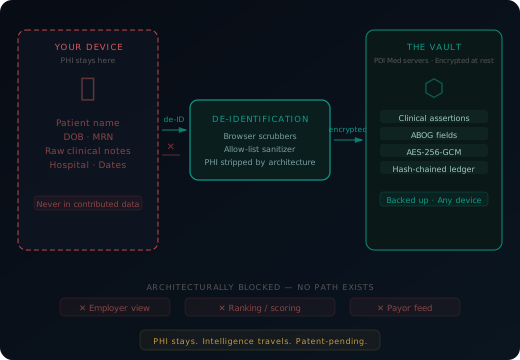
Every case you commit — full clinical detail, patient identity intact — goes to your vault. It is encrypted in your browser with AES-256-GCM under a key that is generated on your device and stays with you, and stored on AWS under PDI Med's Business Associate Agreement with Amazon. Your vault's contents are zero-knowledge to PDI Med: we store only ciphertext and cannot read it. Outside the vault, our servers keep the de-identified case-log details the app needs to list and organize your cases — including dates of service — linked to a patient code only your vault can resolve.

When you switch practices, your vault moves with you. When you need to prove what you documented, the vault is your contemporaneous record, hash-chained and timestamped. The other side of a key we never hold: keep your 12-word recovery code somewhere safe. Lose it and your passkey both, and the vault cannot be opened by anyone — us included.

AES-256-GCM at rest Hosted on AWS under a BAA Vault contents: zero-knowledge Full data portability on request
PHI boundary and vault diagram
06 — ABOG Export

Preview and export any time. The completeness check runs before you file.

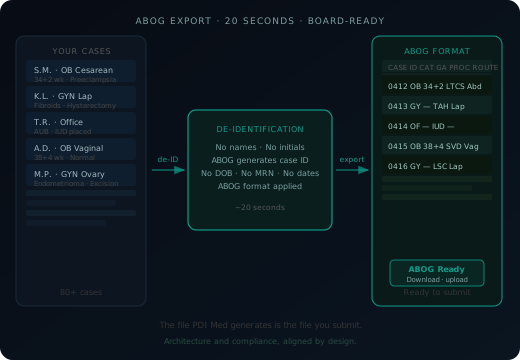
You can always preview and export a working draft of your case list. When you go to output the ABOG file, a completeness checklist runs and flags anything missing — because a case list with a missing uterine weight or an incorrect Office count will fail at ABOG's portal, not at ours.

What you get when you output the file:

  • De-identified to ABOG's case-list requirements — no names or MRNs
  • Formatted to ABOG case list field requirements
  • A completeness checklist run across every required field before you file
  • A submission-ready file you download and upload to ABOG

There is no reformatting step. There is no "check this against ABOG's requirements" step. The file you generate is the file you submit. Separately, a HIPAA §164.514 Safe-Harbor de-identified export is also available.

ABOG export generation
07 — Full Workflow

From patient encounter to ABOG case list. Every step.

01

See the patient

You do the clinical work. You write the note you were going to write anyway — in your EMR, in your own language, in your own format.

02

Copy the note

Copy your signed note from Epic, Cerner, Athena, or any system. H&P, op note, office visit, delivery note — any format works.

03

Parser extracts fields

ABOG section, category, diagnosis, procedures, route, GA, complications, uterine weight. ~20 seconds. Review what was pulled and adjust if needed.

04

Flags fire immediately

Blockers and warnings surface before you commit. Missing uterine weight? Missing GA at admission? Caught now — when the chart is still open and the answer is findable.

05

Commit the case

Confirm and commit. Entry added to your case list. Category count updates. Dashboard counts recalculate. Vault encrypts your full clinical record under your key.

06

Export and upload

Preview or export a working draft any time. When you output the ABOG file, the completeness check flags anything missing. De-identified. ABOG-formatted. Download it, upload it to ABOG. Done.

08 — ABOG Categories

Every ABOG category. Not just the obvious ones.

ABOG’s current case-list categories number 30 obstetrics, 32 gynecology, and 39 office practice — nearly double what most legacy tracking tools support. The Specialty Certifying Examination Bulletin does not enumerate them; ABOG publishes the category lists separately on its website, and that is what PDI Med is built to, not the format you learned in residency. That means peripartum hysterectomy; complicated vaginal deliveries (twin, breech, shoulder dystocia, ECV); placental abnormalities; intraoperative cesarean complications; pregnancy of unknown location; cervical conization; LGBTQIA patients; intimate partner violence and sexual assault; disorders of sexual development and puberty; fecal incontinence; and hyperprolactinemia and galactorrhea — ABOG’s own headings, not our labels — are all first-class fields in PDI, built in from day one, not bolted on later.

What changed from the old format?

Major additions include: Uncategorized (non-counting), co-existent medical comorbidities, abnormal carrier screening, anomalous fetus, preterm delivery <34 weeks, late preterm 34–36w6d, obstetrical hemorrhage as a standalone category, VBAC/TOLAC, peripartum hysterectomy, intraoperative cesarean complications, puerperal infection, second-trimester spontaneous abortion, placental abnormalities, fetal growth abnormalities, pregnancies complicated by fetal anomalies, and antepartum infections.

Renamed or restructured

Premature Rupture of Membranes, Breech and Other Malpresentations, Operative Vaginal Delivery, and Shoulder Dystocia are consolidated under “Complicated vaginal deliveries” and “Induction or augmentation of labor and labor abnormalities.” Primary and repeat cesarean delivery are now separate categories.

Major additions include: Diagnostic laparoscopy (distinct from operative), laparoscopic sterilization (bilateral salpingectomy), surgical management of ectopic pregnancy and PUL, preoperative evaluation of coexisting conditions, D&C as a standalone category, emergency care, robotic-assisted gynecologic surgery, and surgical management / initial management of gynecologic malignancy.

Renamed or split

Laparoscopic hysterectomy is now separate from abdominal hysterectomy. “Operative Laparoscopy” is restructured into multiple procedure-specific categories. Cervical conization/LEEP is a distinct category.

Major additions include: PCOS, geriatric care, geriatric gynecology, primary care issues (HTN, DM, osteoporosis), psychiatric disorders, cancer genetic screening and preventive measures, reproductive tract congenital anomalies, structural uterine abnormalities, LGBTQIA+ health and gender-affirming care, domestic violence/IPV screening and management, abortion counseling and management, management of early pregnancy loss, recurrent pregnancy loss, adnexal abnormalities (office evaluation), and vulvar skin conditions as a distinct category from vulvar disease.

Renamed or removed

“Preventative Care” is now “Preventive health screening, immunization, and counseling.” “Lifestyle Counseling” is now “Wellness counseling.” Standalone Immunizations category removed (absorbed into Preventive health screening). The Office requirement is exactly 40 cases total.

2027 BULLETIN WATCH

What about 2027?

The 2027 ABOG Specialty Certifying Examination Bulletin was issued in June 2026, and PDI has reviewed it. We audit ABOG’s published category lists against the 2026 build — additions, renames, and restructures — and roll confirmed changes into platform subcategories. Users won’t need to track the ABOG bulletins bulletin-by-bulletin. That’s PDI’s job.

Areas we’re watching in the next bulletin cycle based on ABOG’s stated focus areas and current clinical trends:

Placenta accreta spectrum — standalone category Peripartum mental health expansion LGBTQIA+ / gender-affirming care detail Abortion counseling formalization FLS/EMIGS documentation field Telemedicine category language

ABOG GUIDE

Want to understand exactly what ABOG requires — section by section, field by field — along with examiner focus areas, common mistakes, and the timeline? That's what the ABOG Guide is for.

Read the ABOG Guide →

Your collection year is open now — Jul 1, 2026 to Jun 30, 2027.
Every case from here counts.

2 weeks free. $49/month after — founding price, locked forever. The cohort closes when it closes.

Start free — no card required → See pricing
PDI Med is an independent tool. Not affiliated with, endorsed by, sponsored by, or acting on behalf of ABOG, ACOG, or any certifying, accrediting, or specialty body. Nothing here represents or guarantees certification outcomes, examination results, board credit, or acceptance of any case log by any institution. Trademarks are the property of their respective owners.